

How To Register With Casushi Casino
Signing up at Casushi online casino starts with email registration across two form stages. New players enter contact details, full name and date of birth, plus mobile number and address information. Account and marketing preferences appear as separate settings within the form. A verification email confirms the new profile, though no SMS code appears in this flow. Identity and age checks continue after sign up, so details should stay accurate for later payment verification.
3 Steps to Registration
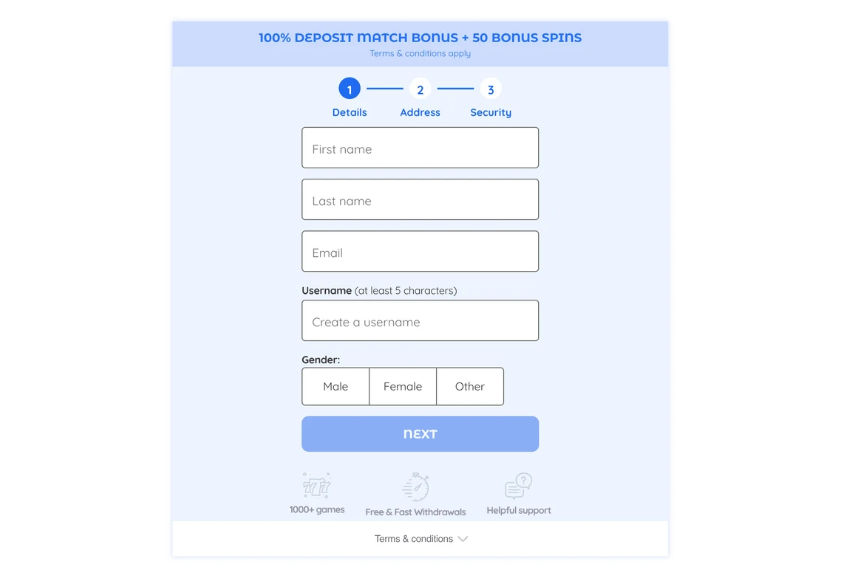
Enter your first name, last name, email and username, then select a gender option.
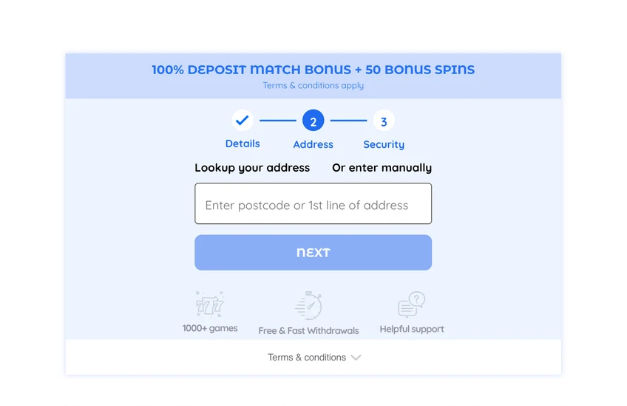
Search for your residential address using a postcode or first address line, or choose manual entry.
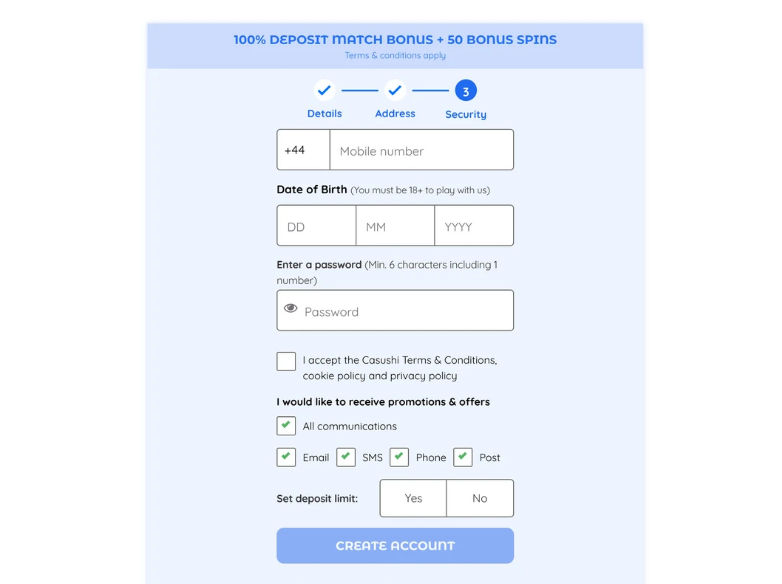
Enter the mobile number, date of birth and password, then review consent options before creating the account.
Signing In To Casushi
Players sign in to Casushi using their registered email address and password. Once logged in, the games, cashier, dashboard and profile settings become available. If credentials are rejected or forgotten, check the registered email inbox for reset instructions.
Complete Your Login in Four Steps
Returning players enter their registered email address and password, then continue after a successful sign in.
Check your entries, then submit or reset your password.
A successful sign in leads to the next step.
Restoring Access After A Forgotten Password
Casushi players who forget their password can use password recovery to restore login access. You will need the registered email address linked to your profile.
- Open the Casushi login form and select the password recovery option.
- Enter your registered email address and submit the recovery request.
- Check your registered email inbox, including the spam folder if needed.
- Follow the reset instructions and create a new password before logging in.
Casushi Account Verification And KYC Checks
Identity and age checks are required for UK players, with extra KYC possible before withdrawal. No guaranteed timeframe for document review is published. Funds may stay pending until identity, age and payment ownership checks are complete. Account review can take place before the standard withdrawal processing period begins.
When Verification Checks Apply
Verification checks may apply at registration, when a withdrawal is requested, or during a payment ownership check. Inconsistent account or funding details can also trigger extra scrutiny. Our review indicates bonus eligibility may depend on successful identity and age verification. Payment ownership checks are separate from reviewing Casushi payment methods.
Documents Needed For Identity Checks
- Passport, driving licence or national identity card;
- Recent utility bill or bank statement as proof of address;
- Card, bank account or e-wallet statement confirming payment ownership.
Casushi Registration, Access And Verification Findings
Our review covered account setup, sign-in behaviour and the published verification rules that apply after registration at Casushi. Several practical constraints emerged around manual data checks, non-guaranteed document review and payment ownership confirmation, which the table below organises by problem, evidence and recommended action.
| Review Finding | Evidence | Practical Response |
|---|---|---|
| Address details need manual review | Testing recorded that address details required manual review before submission could complete | Check address fields carefully before submitting to avoid resubmission delays |
| Mobile number format restriction | Testing showed the mobile-number field required entry in UK format | Enter a UK-format mobile number to prevent a validation error |
| Verification separate from registration | No document upload appeared during registration though identity and age were checked electronically | Expect that further identity documents may be requested later |
| Non-guaranteed verification timing | Published rules state no guaranteed document-review timeframe applies to checks | Allow flexible time for identity and age checks to be completed |
| Additional payment ownership checks | Published rules confirm a payment ownership check may apply before withdrawal | Keep card, bank or e-wallet statements ready to confirm ownership |
| Withdrawal funds held pending checks | Published rules state funds may remain pending until verification is completed | Prepare identity and payment documents in advance of a withdrawal request |
Preparing For Smooth Verification
The main constraint is that verification timing is not guaranteed and may extend before withdrawals proceed. Preparing identity, address and payment documents early can reduce back-and-forth during review. Incomplete or mismatched details may delay withdrawal processing and could require further checks.